Contact

Excel that does the work for you.

Excel automation, trackers and dashboards that replace hours of copying and pasting, plus Word, PowerPoint and Microsoft 365 work that makes your documents look as good as your service.

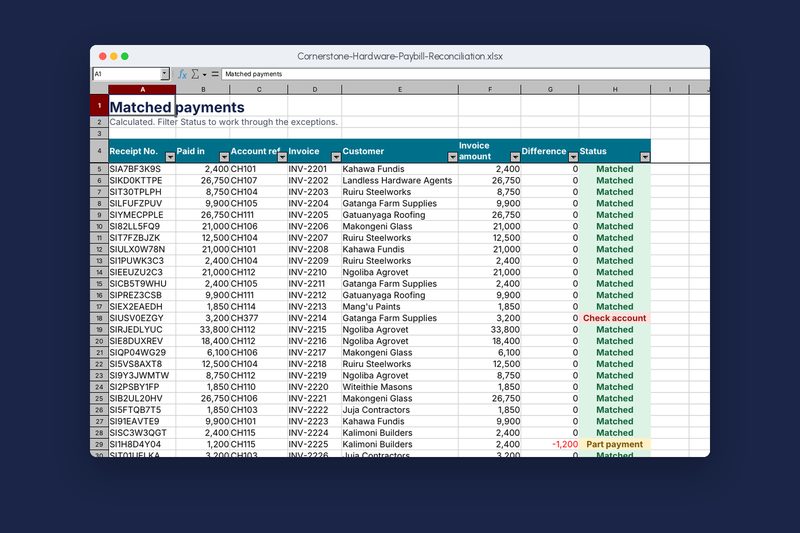
The Paybill reconciliation workbook open on its Match sheet. Real file, synthetic data.

Done properly, and handed over in full.

  • Automation, not just formulas. Power Query, XLOOKUP, macros and Office Scripts that turn a day’s work into a click.
  • Safe for everyday staff. Input forms with dropdowns and checks, and locked calculation sheets.
  • Documented. A plain-English guide inside every workbook explaining how it works and what to do each day.
  • Yours to keep. No passwords you don’t hold, no hidden sheets you can’t open.

Organisations we build this for

  • Bursars and school administrators
  • Accountants and finance teams
  • Shops and distributors tracking stock
  • NGO programme and finance staff
  • Consultants writing proposals
  • Teams preparing tenders

What’s included

Excel automation

Import bank and M-Pesa statements, clean data and update reports with one Refresh.

Trackers

Fees, stock, sales, payroll inputs, leave, assets and projects, set up for your process.

Dashboards in Excel

One-page summaries with charts and slicers that update as data is added.

Business documents

Business plans, proposals, tenders, policies and reports, written and formatted.

Templates

Branded Word letterheads, reports and PowerPoint decks your team reuses.

Microsoft 365

Accounts, Teams, OneDrive and SharePoint set up so files live in one place.

Change a payment. Watch the workbook do the rest.

This is a small piece of the school fees workbook from our projects page. Type a new amount in the Paid column: the balance, status, totals and collection rate all update on their own. That’s what we build into your files, at the scale of your whole organisation.

  • Typed once. Each payment is entered in one place and every summary follows.
  • Checked as you type. Negative numbers and text are rejected before they cause errors.
  • Nothing to break. Formulas live on locked sheets your staff never need to touch.
Fees_Term2.xlsx Demonstration
Fee balances for five pupils
Adm. no.GradeFees duePaidBalanceStatus
Total
Collected

Admission numbers and amounts are made up for this demonstration.

Packages and prices

Prices in Kenya shillings. Your written quotation confirms the exact scope before we start.

Template

A branded Word or PowerPoint template, or a formatted document.

From KES 5,000starting price

  • Word letterhead, report or CV template
  • Or a 10-slide PowerPoint template
  • Styles set up so formatting stays consistent

3 days delivery2 rounds of changes

Choose Template

Excel system

A tracker or workbook built around how your team works.

From KES 15,000starting price

  • Fee, stock, sales or project tracker
  • Input forms with dropdowns and checks
  • Summary sheet and charts
  • One hour of training

7 days delivery3 rounds of changes

Choose Excel system

Excel automation

Workbooks that import, clean and report without copying and pasting.

From KES 35,000starting price

  • Power Query imports from bank, M-Pesa or system exports
  • Matching, reconciliation and exception lists
  • Dashboard with slicers
  • Written guide and video

10 days delivery3 rounds of changes

Choose Excel automation

Need something between packages? We’ll quote it. Compare every price.

A demonstration you can walk through

DemonstrationMatch sheet: each M-Pesa payment paired with its invoice, with exceptions flagged.

Retail · Excel automation

Cornerstone Hardware Paybill reconciliation

Paste the M-Pesa statement and the open invoices into their sheets. Every payment is matched to its invoice, the difference is worked out, and each one is marked Matched, Part payment, Overpaid or Check account.

  • Excel
  • INDEX and MATCH
  • Conditional formatting
  • Filters
  • Charts

Read the case studyFictional client

Questions about documents and excel

Which version of Excel do I need?

Most of our work runs on Excel 2016 or newer. Power Query and XLOOKUP work best on Microsoft 365, and we’ll tell you before we start if your version limits anything.

Can you fix a workbook we already have?

Yes. Send it to us and we’ll tell you what’s wrong, what it would take to fix, and whether rebuilding is cheaper.

Do you use macros?

Only where Power Query and formulas can’t do the job. Macros are signed, commented and explained in the guide.

Is our data safe with you?

We work on copies, delete them when the project ends, and can sign a confidentiality agreement before you share anything.

Other services

Tell us what you need. We’ll send a written quotation.

We reply on WhatsApp within two working hours, Monday to Saturday. The first call is free.

WhatsApp us