Cornerstone Hardware Paybill reconciliation
An Excel tool that matches a month of M-Pesa Paybill payments to customer invoices and lists the few that need a human.
- Client
- Fictional hardware shop, Thika
- Services
- Excel automation, training
- Built with
- Excel formulas, no macros
- Package
- Excel automation, 7 days
This is a demonstration project for a fictional organisation. It shows how we would plan and build this work for you. Ask us for a walkthrough on a call.
The brief
A busy hardware shop takes many Paybill payments a month. Customers type the wrong account number, pay half now and half later, or forget the invoice number, and the accountant matches them by hand at month end.
In this demonstration the shop has 64 open invoices for 16 credit customers and a month of Paybill payments, some of them part payments and some with the wrong account number.
What we built
The Statement sheet follows the standard M-Pesa statement layout, so the export can be pasted straight in. The Invoices sheet takes the list from the shop’s sales system.
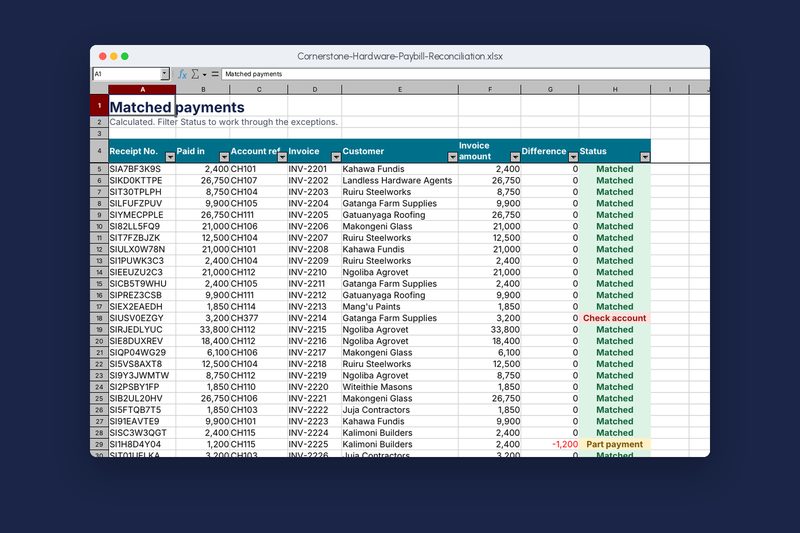
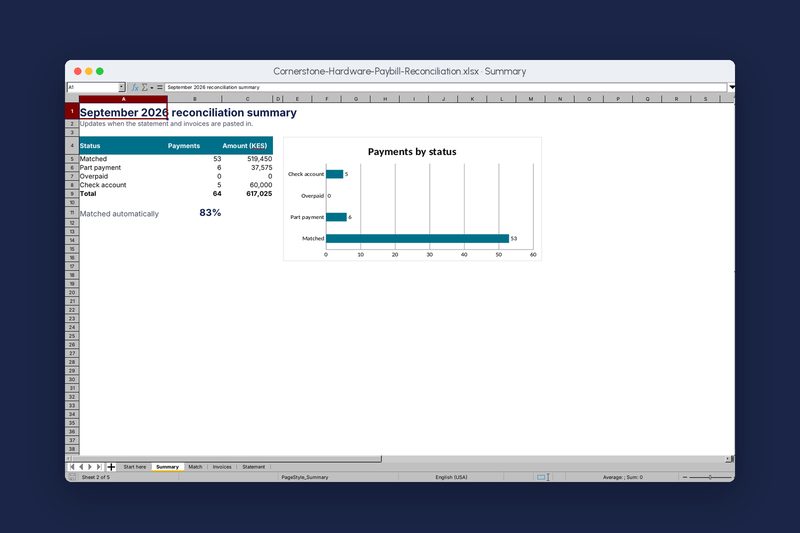
The Match sheet finds the invoice for each payment by its reference or account number, compares amounts, and gives every row a status. The Summary sheet counts and totals each status and shows how many payments matched automatically, so the accountant only works through the short list.
Paste and go
Statement and invoices go in their own sheets. Everything else is formulas.
Matching
Finds the invoice by reference first, then by account number.
Clear statuses
Matched, Part payment, Overpaid and Check account, each in its own colour.
Differences
Shows how much is short or over on every payment.
Summary
Counts, totals and the share matched automatically, with a chart.
Filters
Filter the Match sheet to the rows that need checking.
How we would measure success
For a real client we agree these measures at the start and check them after launch.
- Month-end timeHours spent matching payments at month end.
- Unmatched paymentsShare of payments that need a manual check.
- Debtor daysHow long credit customers take to pay.
- ErrorsPayments posted to the wrong customer.
Built with
- Excel
- INDEX and MATCH
- Conditional formatting
- Filters
- Charts
Download the workbook (Excel, 22 KB)Open it in Excel and try it. All names and amounts are made up.
Screenshots
Taken from the working build, not mock-ups.
Want something like this for your organisation?
Tell us what you need and we’ll send a written quotation within two working days.