Northgate Academy fees workbook
One Excel workbook for a 120-pupil school: payments typed once, balances, arrears and a fees dashboard calculated for you.
- Client
- Fictional school, Nakuru
- Services
- Excel system, training
- Built with
- Excel formulas, no macros
- Package
- Excel system, 7 days
This is a demonstration project for a fictional organisation. It shows how we would plan and build this work for you. Ask us for a walkthrough on a call.
The brief
Many schools keep fees in a notebook or a spreadsheet that only the bursar understands. Totals disagree with the bank, a formula gets typed over, and finding who still owes means scrolling through hundreds of rows.
For this demonstration we set up a primary and junior school with 120 pupils across six grades, a fee structure that changes each term, and payments arriving by M-Pesa, bank and cash.
What we built
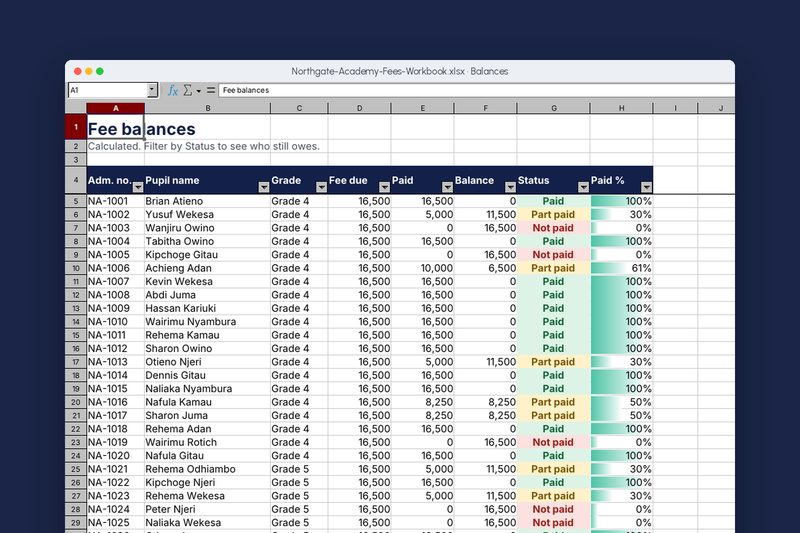
The workbook has a Start here guide, a Fee structure sheet, a Pupils list, a Payments sheet and two calculated sheets. Staff only type on the Payments and Pupils sheets. Admission numbers and payment methods come from dropdowns, and amounts outside a sensible range are refused with a plain message.
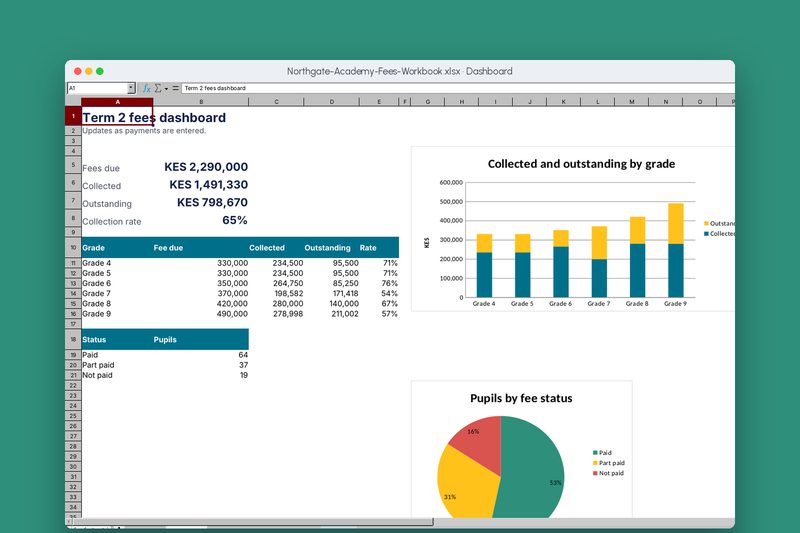
Fees are looked up from the Fee structure, so changing one number updates every pupil. The Balances sheet works out paid, balance, status and percentage paid for each pupil, and the Dashboard totals fees due, collected and outstanding, with charts by grade and by status.
Typed once
Each payment is entered in one place. Balances, totals and charts follow.
Checked as you type
Dropdowns for admission numbers and methods, and limits on amounts.
Status at a glance
Paid, Part paid and Not paid are coloured so arrears stand out.
Fees from one table
Change the term fee for a grade once and every pupil’s fee updates.
Dashboard
Fees due, collected, outstanding and collection rate, by grade and status.
Start here guide
A short guide inside the file tells staff what to do each day.
How we would measure success
For a real client we agree these measures at the start and check them after launch.
- Time to answerMinutes to tell a parent their balance.
- Collection rateShare of fees collected by mid-term.
- ErrorsBalance disputes raised by parents.
- IndependenceBursar runs the workbook without help after training.
Built with
- Excel
- SUMIFS and INDEX/MATCH
- Data validation
- Conditional formatting
- Charts
Download the workbook (Excel, 31 KB)Open it in Excel and try it. All names and amounts are made up.
Screenshots
Taken from the working build, not mock-ups.
Want something like this for your organisation?
Tell us what you need and we’ll send a written quotation within two working days.